docs: update to account for github changes
1 files added
10 files modified
| | |
|---|
| | | --- |
|---|
| | | title: 🪴 Quartz 3. |
|---|
| | | title: 🪴 Quartz 3.3 |
|---|
| | | enableToc: false |
|---|
| | | --- |
|---|
| | | |
|---|
| | |
|---|
| | | |
|---|
| | | **To edit the main home page, open `/content/_index.md`.** |
|---|
| | | |
|---|
| | | To create a link between notes in your garden, just create a normal link using Markdown pointing to the document in question. Please note that **all links should be relative to the root `/content` path**. |
|---|
| | | |
|---|
| | | ```markdown |
|---|
| | | For example, I want to link this current document to `notes/config.md`. |
|---|
| | | [A link to the config page](notes/config.md) |
|---|
| | | ``` |
|---|
| | | |
|---|
| | | Similarly, you can put local images anywhere in the `/content` folder. |
|---|
| | | |
|---|
| | | ```markdown |
|---|
| | | Example image (source is in content/notes/images/example.png) |
|---|
| | |  |
|---|
| | | ``` |
|---|
| | | |
|---|
| | | You can also use wikilinks if that is what you are more comfortable with! |
|---|
| | | |
|---|
| | | ### Front Matter |
|---|
| | | Hugo is picky when it comes to metadata for files. Make sure that your title is double-quoted and that you have a title defined at the top of your file like so. You can also add tags here as well. |
|---|
| | | Hugo is picky when it comes to metadata for files. Make sure that your title is double-quoted and that you have a title defined at the top of your file like so, otherwise the generated page will not have a title! |
|---|
| | | |
|---|
| | | You can also add tags here as well. |
|---|
| | | |
|---|
| | | ```yaml |
|---|
| | | --- |
|---|
| | |
|---|
| | | ## Hosting on GitHub Pages |
|---|
| | | Quartz is designed to be effortless to deploy. If you forked and cloned Quartz directly from the repository, everything should already be good to go! Follow the steps below. |
|---|
| | | |
|---|
| | | ### Enable GitHub Actions |
|---|
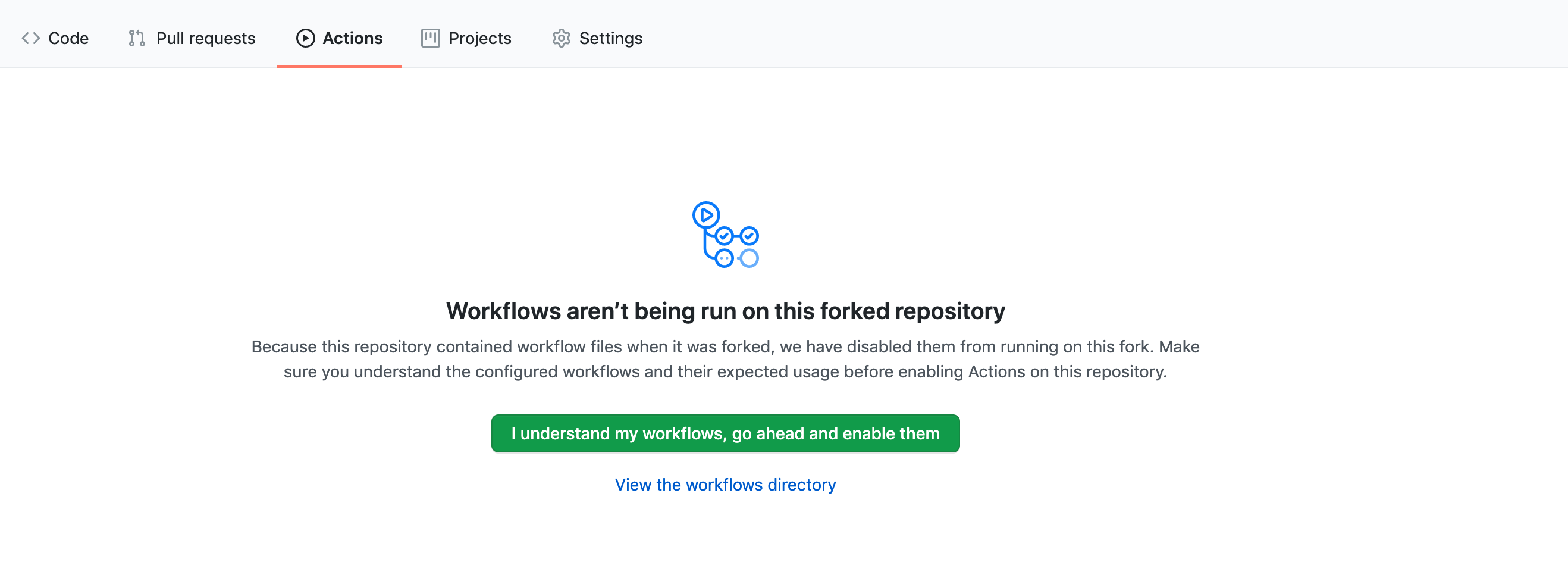
| | | By default, GitHub disables workflows from running automatically on Forked Repostories. Head to the 'Actions' tab of your forked repository and Enable Workflows to setup deploying your Quartz site! |
|---|
| | | ### Enable GitHub Actions Permissions |
|---|
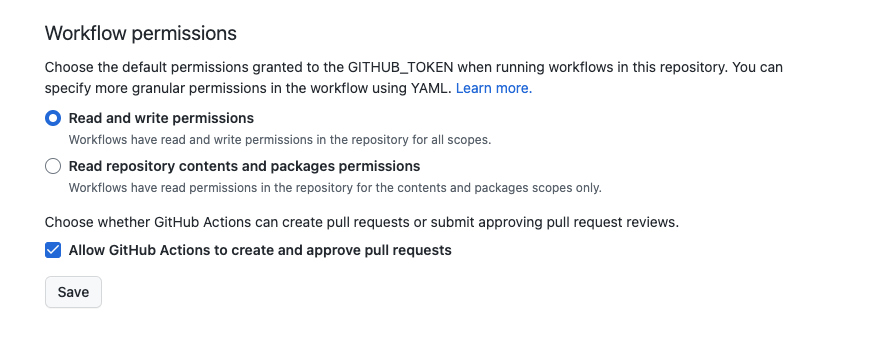
| | | By default, GitHub disables workflows from modifying your files (for good reason!). However, Quartz needs this to write the actual site files back to GitHub. |
|---|
| | | |
|---|
| | | *Enable GitHub Actions* |
|---|
| | | Head to `Settings > Action > General > Workflow Permissions` and choose `Read and Write Permissions` |
|---|
| | | |
|---|
| | | ![[notes/images/github-actions.png]] |
|---|
| | | *Enable GitHub Actions* |
|---|
| | | |
|---|
| | | ### Enable GitHub Pages |
|---|
| | | |
|---|
| | |
|---|
| | | |
|---|
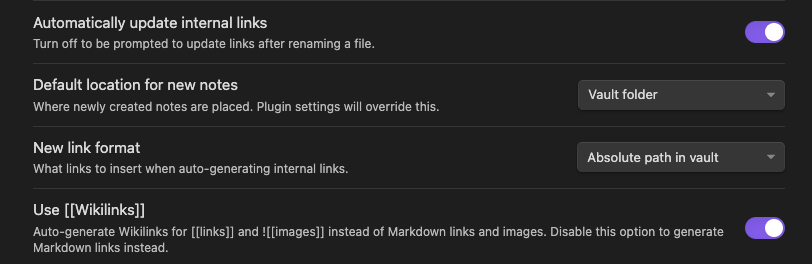
| | | Open Settings > Files & Links and look for these two items: |
|---|
| | | |
|---|
| | | 1. Set the **New link format** to **Absolute Path in vault**. |
|---|
| | | 1. Set the **New link format** to **Absolute Path in vault**. If you have a completely flat vault (no folders), this step isn't necessary. |
|---|
| | | 2. Turn **on** the **Automatically update internal links** setting. |
|---|
| | | |
|---|
| | | *Obsidian Settings* |
|---|
| | | |
|---|
| | | ![[notes/images/obsidian-settings.png]]*Obsidian Settings* |
|---|
| | | |
|---|
| | | ## Templates |
|---|
| | | Inserting front matter everytime you want to create a new Note gets annoying really quickly. Luckily, Obsidian supports templates which makes inserting new content really easily. |
|---|
| | | |
|---|
| | | **If you decide to overwrite the `/content` folder completely, don't remove the `/content/templates` folder!** |
|---|
| | | > [!WARNING] |
|---|
| | | > |
|---|
| | | > **If you decide to overwrite the `/content` folder completely, don't remove the `/content/templates` folder!** |
|---|
| | | |
|---|
| | | Head over to Options > Core Plugins and enable the Templates plugin. Then go to Options > Hotkeys and set a hotkey for 'Insert Template' (I recommend `[cmd]+T`). That way, when you create a new note, you can just press the hotkey for a new template and be ready to go! |
|---|
| | | |
|---|
| | |
|---|
| | | go install github.com/jackyzha0/hugo-obsidian@latest |
|---|
| | | ``` |
|---|
| | | |
|---|
| | | If you are running into an error saying that `command not found: hugo-obsidian`, make sure you set your `GOPATH` correctly! This will allow your terminal to correctly recognize hugo-obsidian as an executable. |
|---|
| | | |
|---|
| | | Afterwards, start the Hugo server as shown above and your local backlinks and interactive graph should be populated! |
|---|
| | | If you are running into an error saying that `command not found: hugo-obsidian`, make sure you set your `GOPATH` correctly (see [[notes/troubleshooting#`command not found: hugo-obsidian`|the troubleshooting page]])! This will allow your terminal to correctly recognize hugo-obsidian as an executable. |
|---|
| | | |
|---|
| | | ## Installing Hugo |
|---|
| | | Hugo is the static site generator that powers Quartz. [Install Hugo with "extended" Sass/SCSS version](https://gohugo.io/getting-started/installing/) first. Then, |
|---|
| | |
|---|
| | | |
|---|
| | | > [!INFO] Docker Support |
|---|
| | | > |
|---|
| | | > If you have Docker installed already, open your terminal, navigate to your folder with Quartz and run `make docker` |
|---|
| | | > If you have the Docker CLI installed already, you can avoid installing `hugo-obsidian` and `hugo`. Instead, open your terminal, navigate to your folder with Quartz and run `make docker` |
|---|
| | | |
|---|
| | | Now that you are happy with how your Quartz instance looks, let's get it hosted! |
|---|
| | | Afterwards, start the Hugo server as shown above and your local backlinks and interactive graph should be populated! Now, let's get it hosted online. |
|---|
| | | |
|---|
| | | > 🌍 Step 5: [Hosting Quartz online!](notes/hosting.md) |
|---|
| | |
|---|
| | | |
|---|
| | | 📁 [Quartz Repository](https://github.com/jackyzha0/quartz) |
|---|
| | | |
|---|
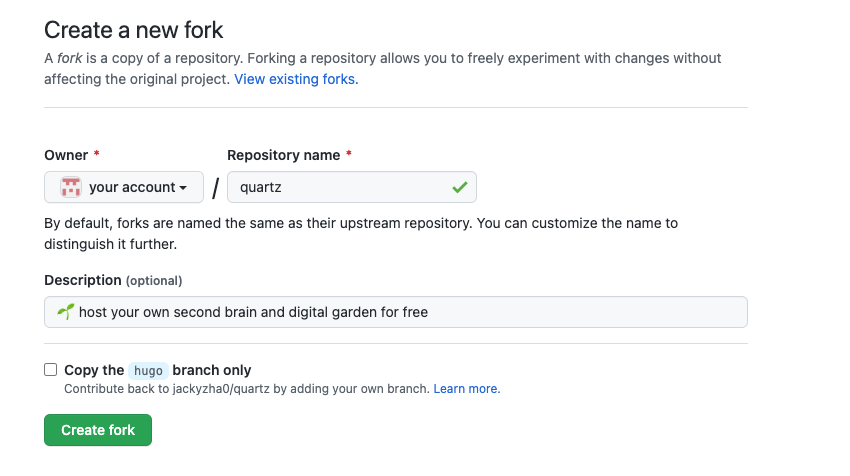
| | | Then, Fork the repository into your own GitHub account. If you don't have an account, you can make on for free [here](https://github.com/join). More details about forking a repo can be found on [GitHub's documentation](https://docs.github.com/en/get-started/quickstart/fork-a-repo). |
|---|
| | | Then, Fork the repository into your own GitHub account. **Make sure that when you fork, you _uncheck_ the 'Copy the `hugo` branch only' option**. |
|---|
| | | |
|---|
| | | If you don't have an account, you can make on for free [here](https://github.com/join). More details about forking a repo can be found on [GitHub's documentation](https://docs.github.com/en/get-started/quickstart/fork-a-repo). |
|---|
| | | |
|---|
| | | ![[notes/images/fork.png]] |
|---|
| | | |
|---|
| | | ### Cloning |
|---|
| | | After you've made a fork of the repository, you need to download the files locally onto your machine. Ensure you have `git`, then type the following command replacing `YOUR-USERNAME` with your GitHub username. |
|---|
| | | After you've made a fork of the repository, you need to download the files locally onto your machine. Ensure you have `git`, then type the following command in your terminal replacing `YOUR-USERNAME` with your GitHub username. |
|---|
| | | |
|---|
| | | ```shell |
|---|
| | | git clone https://github.com/YOUR-USERNAME/quartz |
|---|
| | |
|---|
| | | Make sure you set your `GOPATH` correctly! This will allow your terminal to correctly recognize `hugo-obsidian` as an executable. |
|---|
| | | |
|---|
| | | ```shell |
|---|
| | | # Add the following 2 lines to your ~/.bash_profile |
|---|
| | | # Add the following 2 lines to your ~/.bash_profile (~/.zshrc if you are on Mac) |
|---|
| | | export GOPATH=/Users/$USER/go |
|---|
| | | export PATH=$GOPATH/bin:$PATH |
|---|
| | | |
|---|
| | | # In your current terminal, to reload the session |
|---|
| | | source ~/.bash_profile |
|---|
| | | source ~/.bash_profile # again, (~/.zshrc if you are on Mac) |
|---|
| | | ``` |
|---|
| | | |
|---|
| | | ### How come my notes aren't being rendered? |
|---|
| | |
|---|
| | | |
|---|
| | | {{partial "mermaid.html" .}} |
|---|
| | | |
|---|
| | | <script async src="https://unpkg.com/@floating-ui/core@0.7.3"></script> |
|---|
| | | <script async src="https://unpkg.com/@floating-ui/dom@0.5.4"></script> |
|---|
| | | <script src="https://cdn.jsdelivr.net/npm/@floating-ui/core@1.2.1"></script> |
|---|
| | | <script src="https://cdn.jsdelivr.net/npm/@floating-ui/dom@1.2.1"></script> |
|---|
| | | {{ $popover := resources.Get "js/popover.js" | resources.Fingerprint "md5" | |
|---|
| | | resources.Minify }} |
|---|
| | | <script async src="{{$popover.Permalink}}"></script> |
|---|