2 files added
7 files modified
| | |
|---|
| | | - 🎨 [Customizing and Styling Quartz](notes/config.md) |
|---|
| | | - 🌍 [Hosting Quartz online!](notes/hosting.md) |
|---|
| | | |
|---|
| | | Not convinced yet? Look at some [cool digital gardens](moc/showcase) |
|---|
| | | |
|---|
| | | ## Troubleshooting |
|---|
| | | - 🚧 [Troubleshooting and FAQ](notes/troubleshooting.md) |
|---|
| | | - 🐛 [Submit an Issue](https://github.com/jackyzha0/quartz/issues) |
|---|
| New file |
| | |
|---|
| | | --- |
|---|
| | | title: "Showcase" |
|---|
| | | --- |
|---|
| | | |
|---|
| | | Want to see what Quartz can do? Here are some cool community gardens :) |
|---|
| | | |
|---|
| | | - [Quartz Documentation (this site!)](https://quartz.jzhao.xyz/) |
|---|
| | | - [Jacky Zhao's Garden](https://jzhao.xyz/toc/directory/) |
|---|
| | | |
|---|
| | | If you want to see your own on here, submit a [Pull Request adding yourself to this file](https://github.com/jackyzha0/quartz/blob/hugo/content/moc/showcase.md)! |
|---|
| | |
|---|
| | | title: "Configuration" |
|---|
| | | --- |
|---|
| | | |
|---|
| | | ## Configuration |
|---|
| | | Quartz is designed to be extremely configurable. You can find the bulk of the configuration scattered throughout the repository depending on how in-depth you'd like to get. |
|---|
| | | |
|---|
| | | The majority of configuration can be be found under `data/config.yaml`. An annotated example configuration is shown below. |
|---|
| | | |
|---|
| | | ```yaml |
|---|
| | | name: Your name here! # Shows in the footer |
|---|
| | | enableToc: true # Whether to show a Table of Contents |
|---|
| | | description: Page description to show to search engines |
|---|
| | | page_title: Quartz Example Page # Default Page Title |
|---|
| | | |
|---|
| | | links: # Links to show in footer |
|---|
| | | - link_name: Twitter |
|---|
| | | link: https://twitter.com/_jzhao |
|---|
| | | - link_name: Github |
|---|
| | | link: https://github.com/jackyzha0 |
|---|
| | | ``` |
|---|
| | | |
|---|
| | | ### Graph View |
|---|
| | | To customize the Interactive Graph view, you can poke around `data/graphConfig.yaml`. |
|---|
| | | |
|---|
| | | ```yaml |
|---|
| | | enableLegend: false # automatically generate a legend |
|---|
| | | enableDrag: true # allow dragging nodes in the graph |
|---|
| | | enableZoom: true # allow zooming and panning the graph |
|---|
| | | paths: # colour specific nodes path off of their path |
|---|
| | | - /moc: "#4388cc" |
|---|
| | | ``` |
|---|
| | | |
|---|
| | | |
|---|
| | | ## Styling |
|---|
| | | ## Layouts |
|---|
| | | ### Home Page |
|---|
| | | Want to go even more in-depth? You can add custom CSS styling and change existing colours through editing `assets/custom.scss`. If you'd like to target specific parts of the site, you can add ids and classes to the HTML partials in `/layouts/partials`. |
|---|
| | | |
|---|
| | | ### Partials |
|---|
| | | Partials are what dictate what actually gets rendered to the page. Want to change how pages are styled and structured? You can edit the appropriate layout in `/layouts`. |
|---|
| | | |
|---|
| | | For example, the structure of the home page can be edited through `/layouts/index.html`. To customize the footer, you can edit `/layouts/partials/footer.html` |
|---|
| | | |
|---|
| | | More info about partials on [Hugo's website.](https://gohugo.io/templates/partials/) |
|---|
| | | |
|---|
| | | Still having problems? Checkout our [FAQ and Troubleshooting guide](notes/troubleshooting.md). |
|---|
| | |
|---|
| | | |
|---|
| | | **All content in your garden can found in the `/content` folder.** To make edits, you can open any of the files and make changes directly and save it. You can organize content into any folder you'd like. |
|---|
| | | |
|---|
| | | **To edit the main home page, open `/content/_index.md`.** |
|---|
| | | |
|---|
| | | To create a link, just create a normal link using Markdown pointing to the document in question. Please note that **all links should be relative to the root `/content` path**. |
|---|
| | | |
|---|
| | | ```markdown |
|---|
| | |
|---|
| | | [A link to the config page](config.md) |
|---|
| | | ``` |
|---|
| | | |
|---|
| | | ### Front Matter |
|---|
| | | Hugo is picky when it comes to metadata for files. Ensure that you have a title defined at the top of your file like so: |
|---|
| | | |
|---|
| | | ```markdown |
|---|
| | | --- |
|---|
| | | title: "Example Title" |
|---|
| | | --- |
|---|
| | | |
|---|
| | | ## Headers should start at H2 |
|---|
| | | Rest of your content here... |
|---|
| | | ``` |
|---|
| | | |
|---|
| | | ### Obsidian |
|---|
| | | I *strongly* recommend using [Obsidian](http://obsidian.md/) as a way to edit and grow your digital garden. It comes with a really nice editor and graphical interface to preview all of my local files. |
|---|
| | | |
|---|
| | |
|---|
| | | title: "Deploying to GitHub Pages" |
|---|
| | | --- |
|---|
| | | |
|---|
| | | ## GitHub Pages |
|---|
| | | |
|---|
| | | ## Custom subdomain |
|---|
| | | Change `baseURL` in `/config.toml` |
|---|
| | | ## GitHub Pages |
|---|
| | | Quartz is designed to be effortless to deploy. If you forked and cloned Quartz directly from the repository, everything should already be good to go! You can head to `<YOUR-GITHUB-USERNAME.github.io/quartz` to see it live. |
|---|
| | | |
|---|
| | | By default, Github Actions will run on forks of repos. You should not need to do any more config to see it up to date. |
|---|
| | | |
|---|
| | | ### Custom subdomain |
|---|
| | | Have a fancy custom domain or want to subdomain your Quartz? That's easy too. |
|---|
| | | |
|---|
| | | Change `baseURL` in `/config.toml`. [Reference.](https://github.com/jackyzha0/quartz/blob/hugo/config.toml) |
|---|
| | | |
|---|
| | | ```toml |
|---|
| | | baseURL = "https://quartz.jzhao.xyz/" |
|---|
| | | baseURL = "https://<YOUR-DOMAIN>/" |
|---|
| | | ``` |
|---|
| | | |
|---|
| | | Change `cname` in `/.github/workflows/deploy.yaml`. [Reference.](https://github.com/jackyzha0/quartz/blob/hugo/.github/workflows/deploy.yaml) |
|---|
| | | |
|---|
| | | ```yaml |
|---|
| | | - name: Deploy |
|---|
| | | uses: peaceiris/actions-gh-pages@v3 |
|---|
| | | with: |
|---|
| | | github_token: ${{ secrets.GITHUB_TOKEN }} |
|---|
| | | publish_dir: ./public |
|---|
| | | publish_branch: master |
|---|
| | | cname: <YOUR-DOMAIN> |
|---|
| | | ``` |
|---|
| | | |
|---|
| | | ### Registrar |
|---|
| | | For this last bit to take effect, you also need to create a CNAME record with the DNS provider you register your domain with (i.e. NameCheap, Google Domains). |
|---|
| | | |
|---|
| | | GitHub has some [documentation on this](https://docs.github.com/en/pages/configuring-a-custom-domain-for-your-github-pages-site/managing-a-custom-domain-for-your-github-pages-site), but the tldr; is to |
|---|
| | | |
|---|
| | | 1. Go to your forked repository (`github.com/<YOUR-GITHUB-USERNAME>/quartz`) settings page and go to the Pages tab. Under "Custom domain", type your custom domain, then click **Save**. |
|---|
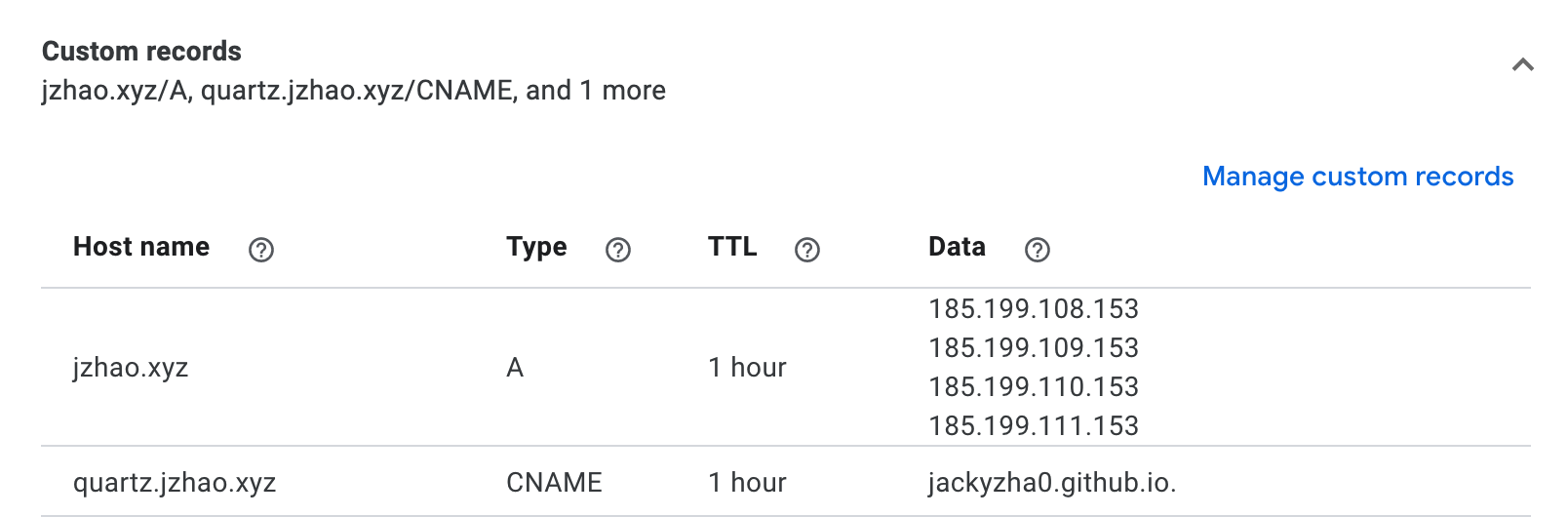
| | | 2. Go to your DNS Provider and create a CNAME record that points from your domain to `<YOUR-GITHUB-USERNAME.github.io.` (yes, with the trailing period). |
|---|
| | | |
|---|
| | | *Example Configuration for Quartz* |
|---|
| | | 3. Wait 30 minutes to an hour for the network changes to kick in. |
|---|
| | | 4. Done! |
|---|
| | | |
|---|
| | | |
|---|
| | | Now that your Quartz is live, let's figure out how to make Quartz really *yours*! |
|---|
| | | |
|---|
| | | 🎨 [Customizing Quarts](notes/config.md) |
|---|
| | | |
|---|
| | | Having problems? Checkout our [FAQ and Troubleshooting guide](notes/troubleshooting.md). |
|---|
| | |
|---|
| | | title: "Obsidian Vault Integration" |
|---|
| | | --- |
|---|
| | | |
|---|
| | | ## Setup |
|---|
| | | Obsidian is the preferred way to use Quartz. You can either create a new Obsidian Vault or link one that your already have. |
|---|
| | | |
|---|
| | | ## New Vault |
|---|
| | | If you don't have an existing Vault, download |
|---|
| | | ### New Vault |
|---|
| | | If you don't have an existing Vault, [download Obsidian](https://obsidian.md/) and create a new Vault in the `/content` folder that you created and cloned during the [setup](notes/setup.md). |
|---|
| | | |
|---|
| | | ## Linking an existing Vault |
|---|
| | | ### Linking an existing Vault |
|---|
| | | The easiest way to use an existing Vault is to copy all of our files (directory and hierarchies intact) into the `/content` folder. |
|---|
| | | |
|---|
| | |  |
|---|
| | | ## Settings |
|---|
| | | Great, now that you have your Obsidian linked to your Quartz, let's fix some settings so that they play well. |
|---|
| | | |
|---|
| | | Under Options > Files and Links, set the New link format to always be Absolute Path in Vault and disabled WikiLinks so Obsidian generates regular Markdown links. |
|---|
| | | |
|---|
| | | *Obsidian Settings* |
|---|
| | | |
|---|
| | | ## Templates |
|---|
| | | Inserting front matter everytime you want to create a new Note gets really annoying really quickly. Luckily, Obsidian supports templates which makes inserting new content really easily. |
|---|
| | | |
|---|
| | | **If you decide to overwrite the `/content` folder completely, don't remove the `/content/templates` folder!** |
|---|
| | | |
|---|
| | | Head over to Options > Core Plugins and enable the Templates plugin. Then go to Options > Hotkeys and set a hotkey for 'Insert Template'. That way, when you create a new note, you can just press the hotkey for a new template and be ready to go! |
|---|
| | |
|---|
| | | --- |
|---|
| | | title: "Troubleshooting and FAQ" |
|---|
| | | --- |
|---|
| | | |
|---|
| | | ## Common Pitfalls |
|---|
| | | ### How come my notes aren't being rendered? |
|---|
| | | You probably forgot to include front matter in your Markdown files. You can either setup [Obsidian](notes/obsidian) to do this for you or you need to manually define it. More details in [the 'how to edit' guide](notes/editing.md). |
|---|
| | | |
|---|
| | | ### My custom domain isn't working! |
|---|
| | | Walk through the steps in [the hosting guide](notes/hosting.md) again. Make sure you wait 30 min to 1 hour for changes to take effect. |
|---|
| | | |
|---|
| | | ### How do I setup Google Analytics? |
|---|
| | | You can edit it in `config.toml` and either use a V3 (UA-) or V4 (G-) tag. |
|---|
| | | |
|---|
| | | ### How do I change the content on the home page? |
|---|
| | | To edit the main home page, open `/content/_index.md`. |
|---|
| | | |
|---|
| | | ### How do I change the colours? |
|---|
| | | You can change the theme by editing `assets/custom.scss`. More details on customization and themeing can be found in the [customization guide](notes/config.md). |
|---|
| | | |
|---|
| | | ### How do I add images? |
|---|
| | | You can put images anywhere in the `/content` folder. The only caveat is that you should reference them in your Markdown by prefixing it with a `/`. |
|---|
| | | |
|---|
| | | ```markdown |
|---|
| | | Example image (source is in content/notes/images/example.png) |
|---|
| | |  |
|---|
| | | ``` |
|---|
| | | |
|---|
| | | ### My Interactive Graph and Backlinks aren't up to date |
|---|
| | | By default, the `linkIndex.yaml` (which Quartz needs to generate the Interactive Graph and Backlinks) are not regenerated locally. To set that up, see the guide on [local editing](notes/editing.md) |
|---|
| | | |
|---|
| | | ### Can I use React/Vue/some other framework? |
|---|
| | | Not out of the box. You could probably make it work by editing `/layouts/_default/single.html` but that's not what Quartz is designed to work with. 99% of things you are trying to do with those frameworks you can accomplish perfectly fine using just vanilla HTML/CSS/JS. |
|---|
| | | |
|---|
| | | ## Still Stuck? |
|---|
| | | Quartz isn't perfect! If you're still having troubles, file an issue in the GitHub repo with as much information as you can reasonably provide. |
|---|
| | | |
|---|
| | | 🐛 [Submit an Issue](https://github.com/jackyzha0/quartz/issues) |
|---|
| | |
|---|
| | | enableLegend: false |
|---|
| | | enableDrag: true |
|---|
| | | enableZoom: true |
|---|
| | | base: |
|---|
| | | node: "#284b63" |
|---|
| | | activeNode: "#f28482" |
|---|
| | | inactiveNode: "#a8b3bd" |
|---|
| | | link: "#babdbf" |
|---|
| | | activeLink: "#5a7282" |
|---|
| | | paths: |
|---|
| | | - /moc: "#4388cc" |
|---|